
Option Compatibility URL Mode For The Ticket Detail View
In some cases it is not possible for your customers to open the ticket detail view within the plugin folder. Or you just want to

In some cases it is not possible for your customers to open the ticket detail view within the plugin folder. Or you just want to

This option is used only if the option wcTicketDontAllowRedeemTicketBeforeStart is activated. You can set hours, from when the ticket redeem operation is allowed. The hours

To prevent early access, you can activate the option to check the event start date and time. Helpful if you have the same event multiple

To see the confirmed validation checks on the ticket scanner, activate this option. The information is only visible if you do not hide the ticket

If this option is activated, then each ticket scan will be count. The counter is visible within the admin ticket detail view. You can see

To make sure, that only paid tickets can be redeemed, activate this option. Helpful, if you are generating tickets before the payment is completed. If

You can activate the option, that only logged in user can scan and redeem a ticket. The user need to be an administrator. Instead of

You can limit access to the ticket scanner. By default everybody can access the ticket scanner. It is also possible to limit the usage of
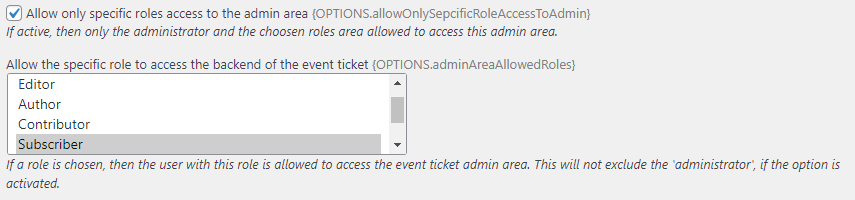
You can limit access to the plugin admin area. Activate the option allowOnlySepcificRoleAccessToAdmin to allow only the selected roles of the option adminAreaAllowedRoles. The options are
You can limit access to the plugin admin area. Activate the option allowOnlySepcificRoleAccessToAdmin to allow only the selected roles of the option adminAreaAllowedRoles. The options are